|
Posted: 07 Jun 2016 03:36 AM PDT
Google 對 Chromebook 在校園應用的推廣頗有成果,這得力於大量優秀的線上工具,
另外 Google 這幾年也大力推廣程式教育、自造者教育主題,可參考: 兩者結合,就誕生了 Google 最新推出的這一款 Chrome OS、 Google Chrome 教育應用:「 Coding with Chrome 」,它讓學生們只要透過任何電腦上的 Google 瀏覽器,即使在離線狀態下,也能練習寫程式、學習控制機器人、
只要在 Google 瀏覽器安裝「 Coding with Chrome 」,那麼之後就能在「離線狀態」下,
 第一次打開「 Coding with Chrome 」,有兩種模式可以選擇,初學者模式適合練習程式邏輯,  在進階者模式中,「 Coding with Chrome 」支援用程式碼寫出應用程式,或是可以練習用 HTML 語法撰寫網頁,也支援學習機器人應用的程式語法。  「 Coding with Chrome 」不是那些「玩遊戲學程式」的應用, 老師與學生可以真的在這款工具中寫出程式碼習題,  這樣無論是在練習寫網頁、寫遊戲、寫應用時,「 Coding with Chrome 」左右兩欄所見即所得的視窗,都能做為很好的學習工具來使用。  有興趣的朋友或老師,可以研究看看「 Coding with Chrome 」的官方網站,獲得更多相關的介紹與資訊。 延伸閱讀相關文章: 「 Coding with Chrome 」應用程式下載 轉貼本文時禁止修改,禁止商業使用, |
2016年6月11日 星期六
Google 新教育應用讓學生用瀏覽器就能離線學寫程式

2015年4月30日 星期四
Chrome supports TCP & UDP Sockets
[From: Chrome supports TCP & UDP Sockets, By: Alex Maccaw]
Traditionally browsers haven’t been able to make raw socket requests to arbitrary endpoints, mostly due to security concerns. Although the majority of browsers now have WebSockets, the caveat is that the server needs to have specific support for the WebSocket handshake. This has limited the type of protocols and APIs that the browser could communicate with.
However, Chrome’s changing all of that. Canary now has support for raw TCP and UDP sockets in its ‘experimental’ APIs. These features are only available for extensions and, although documented, are hidden for the moment. Having said that, some developers are already creating interesting projects using it, such as this IRC client.
To access this API, you’ll need to enable the
experimental flag in your extension’s manifest. Using sockets is pretty straightforward, for example:chrome.experimental.socket.create('tcp', '127.0.0.1', 8080, function(socketInfo) {
chrome.experimental.socket.connect(socketInfo.socketId, function (result) {
chrome.experimental.socket.write(socketInfo.socketId, "Hello, world!");
});
});
Although the API is still under flux, already I can see some amazing potential for it, especially when it comes to P2P. A few years ago I did a bit of work concerning firewall tunneling with TCP, which should now be possible in Chrome. This API should lead itself to some interesting applications, like P2P games, collaboration and data transfer.
如何開始寫 Chrome App
Google I/O 2010 的 Day 1 Keynote 中介紹了 Chrome Web Store,顯然這就是(不久的)未來在 Chrome/Chromium/(Chrome OS) 的應用程式平台及 marketplace。
而在這樣的平台之下,使用者便可以在 Chrome (泛指 Google Chrome, Chromium, 以及 Chrome OS)上面安裝「應用程式」,當然,這個應用程式的運作平台就是 Chrome 這個瀏覽器,於是你也可以猜想得到--應用程式是以 HTML/CSS/JavaScript 所開發的,而隨著 Google 一直宣傳著 HTML5 Rocks ,對於有志於開發「Chrome App」的人來說,當然是選擇 HTML5 再加上 CSS3 作為開發技術囉。(平衡報導一下:只要是目前能在 Chrome 上使用的網頁技術都可以啦,如 Flash、Native Client 都可以,不然怎麼會有植物大戰殭屍、樂高星際大戰呢 :P)

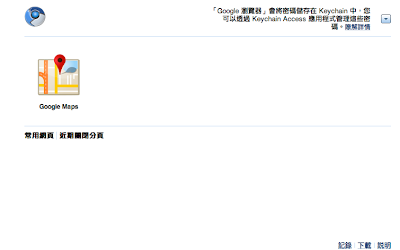
Chrome 裝了 Chrome Apps 的開始畫面
--enable-apps 的參數來開啟 Chrome App 的支援,以 Mac 版為例,簡單的方法可以在終端機下以這樣的指令來啟動:
open '/Applications/Google Chrome.app' --args --enable-apps
在 Windows 上則可以去修改桌面捷徑的內容。要開發 Chrome App 可以參考這個官方文件,但由於目前還算是早期測試,所以文件規格會突然變動,當你哪一天發現自己寫的 Chrome App 不會動的時候,可以來這裡看看,或是到討論區看看有沒有新消息。
至於 Chrome App 的結構,與 Chrome Extensions 的結構幾乎一模一樣(參考:開發文件)--用一個資料夾將一個 app 裝起來,而裡面至少有一個
manifest.json 檔案,用來描述 app。Chrome 官方以 Google Maps App 為例,示範了如何將一個原本就是 web application 的網站包裝成一個 Chrome App。而當你將 Chrome App 寫好了之後,可以就像開發 Chrome extension 那樣,在
chrome://extensions 這一頁,打開「開發人員模式」,再「載入未封裝擴充功能」將這個 app 載入即可。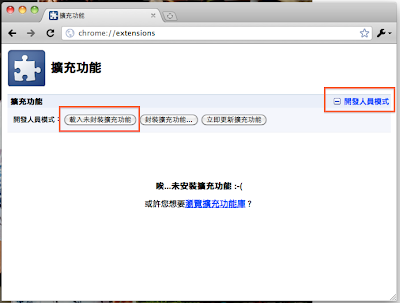
安裝 chrome app 的方式與 chrome ext 一模一樣
manifest.json 中的 app 部份修改像是這樣:
...

"app": {

  "launch": {

    "local_path": "main.html"

  }

}

...
以 local_path 來指定 app 啟動的 html 檔案,作為 app 的進入點。這裡有一個從 Chromium 討論區上網友分享的作品--Ajax Animator(需先開啟 chrome app 功能再下載安裝),還蠻有模有樣的(以 ExtJS 所開發的一個 app),也許你可以由這個 app 來發現究竟可以在 chrome 這樣一個應用程式平台玩出什麼樣的可能性。如果你覺得學習 HTML5, CSS3 (可能為了得支援過時的瀏覽器等等的原因)無法應用在現有的網站產品上,那麼,相信在 Chrome 這個「平台」上,會有很多發揮的空間。
訂閱:
文章 (Atom)